
Tech Tantrums: How to End Screen Time Without Drama
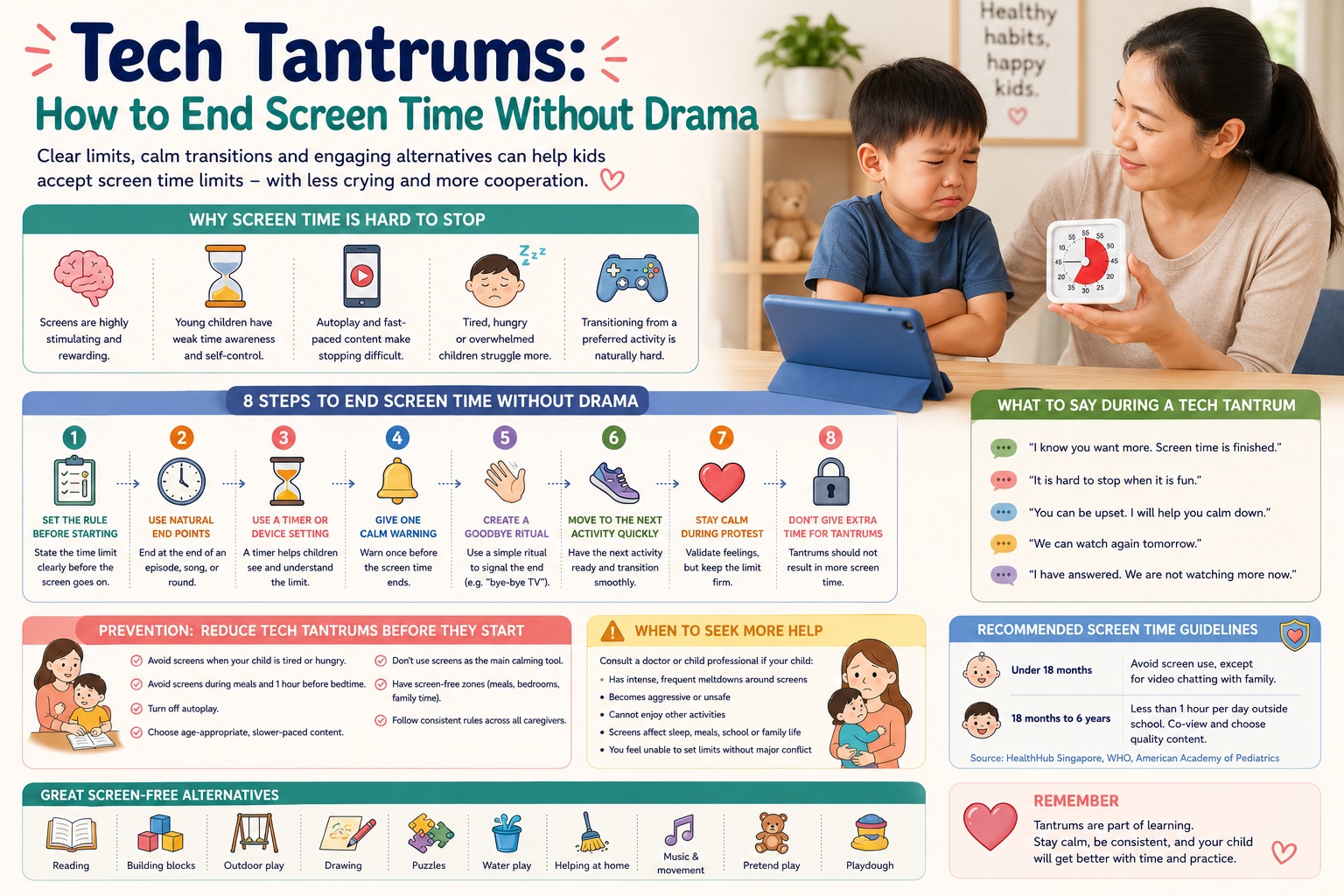
Tech Tantrums: How to End Screen Time Without Drama
Meta description: Learn why children have tantrums when screen time ends and how parents can reduce meltdowns with routines, warnings, choices, calm limits and screen-free alternatives.
What Are Tech Tantrums?
A tech tantrum happens when a child cries, screams, bargains, runs away, refuses to hand over a device or becomes aggressive when screen time ends. This can happen with television, tablets, phones, video games, YouTube, cartoons or educational apps.
Tech tantrums are common because screens are highly engaging. Many videos and games are designed to keep children watching, clicking or waiting for the next reward. For young children, stopping suddenly can feel frustrating because their self-control, time awareness and emotional regulation are still developing.
The goal is not to make children “never upset”. The goal is to help them accept screen-time limits more calmly over time.
Quick Answer for Busy Parents
To end screen time without drama, prepare your child before screen time starts. Set a clear limit, use a timer, give a short warning, offer a simple choice, and move quickly to a screen-free activity. Stay calm if your child protests. Do not extend screen time because of crying, or the child may learn that tantrums work.
Why Screen Time Is Hard to Stop
Ending screen time is difficult for many children because:
- Children have weak time awareness: “Five more minutes” may not feel meaningful to a young child.
- Screens give fast rewards: Bright colours, songs, movement and game rewards can be very stimulating.
- Autoplay makes stopping harder: The next video begins before the child has time to accept the ending.
- Children may be tired or hungry: Tantrums are more likely when a child is already dysregulated.
- Screens may be used for calming: If a child often gets a screen when upset, they may struggle to calm down without it.
- Transitions are hard: Moving from a preferred activity to a less exciting activity is difficult for many children.
Step-by-Step: How to End Screen Time Without Drama
1. Set the Rule Before the Screen Starts
Do not wait until your child is fully absorbed before announcing the limit. State the rule before turning on the device.
Try saying:
- “You can watch one episode. When it ends, we switch off.”
- “You can play for 15 minutes. When the timer rings, the tablet rests.”
- “After this video, we will keep the phone and go for dinner.”
2. Use Natural End Points
Young children cope better when screen time ends at a natural stopping point, such as the end of one episode, one song, one round or one short game.
Avoid saying “just a while” because it is unclear. “One episode” or “one round” is easier to understand.
3. Use a Timer or Device Setting
A timer makes the limit feel less like a parent suddenly taking something away. Many devices also have built-in time limits or parental controls. The American Academy of Pediatrics suggests using device settings as a helper when ending screen time.
Try saying: “The timer will tell us when screen time is finished.”
4. Give One Calm Warning
Give a short warning before the end. Do not repeat many warnings, as repeated reminders may become part of the negotiation.
- “Two more minutes, then tablet off.”
- “This is the last video.”
- “When the song ends, we say bye-bye to the screen.”
5. Create a Goodbye Ritual
A goodbye ritual can make the transition easier for toddlers and preschoolers.
- “Bye-bye, TV. See you tomorrow.”
- “Tablet is going to sleep now.”
- “Let’s press the button together.”
6. Move Immediately to the Next Activity
Do not leave a gap after switching off. A bored child may return to begging for the screen. Prepare the next activity in advance.
- Snack time
- Bath time
- Outdoor play
- Reading a book
- Drawing
- Building blocks
- Helping with a simple household task
7. Stay Calm During Protest
Your child may still cry. This does not mean the method has failed. It means your child is learning to handle disappointment.
Try saying:
- “I know you want more. Screen time is finished.”
- “It is hard to stop when it is fun.”
- “You can be upset. I will help you calm down.”
- “We can watch again tomorrow.”
8. Do Not Give Extra Screen Time Because of the Tantrum
If a child cries and then gets more screen time, the child may learn that crying, screaming or bargaining is effective. Stay kind but firm.
This does not mean ignoring your child emotionally. You can comfort the child while still holding the limit.
What to Say During a Tech Tantrum
| Situation | What Parents Can Say | Why It Helps |
|---|---|---|
| Child screams, “One more!” | “You really want one more. Screen time is finished.” | Validates feelings without changing the boundary. |
| Child refuses to return the device | “You can give it to me, or I can help you keep it.” | Gives a choice while keeping the limit firm. |
| Child cries loudly | “You are upset. I will stay nearby while you calm down.” | Shows support without giving in. |
| Child says, “I hate you!” | “You are angry. I still love you. The screen is still finished.” | Separates emotion from the rule. |
| Child keeps bargaining | “I have answered. We are not watching more now.” | Prevents long negotiation. |
Prevention: Reduce Tech Tantrums Before They Start
1. Avoid Screens When Your Child Is Already Tired or Hungry
Screen-time meltdowns are more likely when children are tired, hungry, restless or stressed. If your child usually melts down before dinner or bedtime, that may be the worst time to use screens.
2. Avoid Screens During Meals
Screens during meals can make it harder for children to notice hunger, fullness and family interaction. HealthHub Singapore advises parents not to use screens during meals.
3. Avoid Screens Before Bedtime
Screens close to bedtime may interfere with calming down and sleep routines. HealthHub Singapore recommends avoiding screens one hour before bedtime for young children.
4. Turn Off Autoplay
Autoplay makes every ending feel like an interruption. Turn off autoplay where possible, especially on video platforms.
5. Choose Slower, Age-Appropriate Content
Very fast-paced or reward-heavy content may make it harder for children to stop. Choose age-appropriate, educational content and watch together when possible.
6. Do Not Use Screens as the Main Calming Tool
It is understandable to use screens sometimes when parents are busy or exhausted. However, if screens become the main way a child calms down, the child may struggle to develop other calming skills.
7. Have Screen-Free Zones
Consider keeping bedrooms, dining areas and family conversation times screen-free. This makes limits easier because the rule is linked to place and routine, not just parental mood.
Age-by-Age Tips
Under 18 Months
For babies and younger toddlers, avoid screen use as much as possible except for video chatting with family. At this age, children learn best through face-to-face interaction, movement, touch, play and caregiver response.
18 Months to 3 Years
Keep screen time short, supervised and predictable. Use simple rules such as “one song” or “one short video”. Toddlers need help transitioning, so use a timer, goodbye ritual and immediate next activity.
3 to 6 Years
Preschoolers can understand simple family rules. Involve them in choosing when screen time happens, but keep the final limit clear. For example: “You can watch after bath, but not during dinner.”
Primary School Children
Older children can help create a family media plan. Discuss homework, sleep, outdoor play, family meals and device-free times. Use parental controls where needed, but also teach self-management gradually.
Common Mistakes That Make Tech Tantrums Worse
- Saying “five more minutes” repeatedly: This teaches children that the limit can keep moving.
- Taking the device away suddenly without warning: This can trigger stronger resistance.
- Giving in after a tantrum: This may reward the meltdown.
- Using screens to stop every tantrum: Children may not learn other calming skills.
- Allowing autoplay: The next video makes stopping harder.
- Letting screens replace sleep, meals, movement or family interaction: Screen use should not crowd out healthy routines.
- Parents using phones heavily while setting limits: Children notice adult habits too.
A Simple Screen-Time Ending Routine
Parents can use the same routine every time so the child knows what to expect.
- Before starting: “You can watch one episode.”
- Near the end: “This is the last part.”
- At the end: “Screen time is finished.”
- Goodbye ritual: “Bye-bye, tablet. Tablet is resting.”
- Next activity: “Now we are going to wash hands and eat.”
- If child cries: “You are upset. I will help you. The tablet is still resting.”
Screen-Free Activities to Offer After Screen Time
- Water play during bath time
- Stickers or colouring
- Blocks or magnetic tiles
- Simple puzzles
- Reading one book together
- Outdoor walk or playground time
- Helping to wash fruit
- Sorting socks or toys
- Playdough
- Music and movement
- Pretend cooking
- Quiet cuddle time
When Screen Tantrums May Need More Attention
Occasional crying when screen time ends is common. However, parents may want to seek help if screen-related meltdowns are intense, frequent or affecting daily life.
Consider speaking to a doctor, psychologist, counsellor or child development professional if:
- Your child becomes aggressive or unsafe when screens are removed.
- Screen time is replacing sleep, meals, schoolwork, outdoor play or social interaction.
- Your child cannot enjoy other activities without screens.
- Tantrums last a very long time or happen almost every day.
- Your child uses screens late at night and sleep is affected.
- Your child has developmental, attention, sensory or emotional regulation concerns.
- Parents feel unable to set limits without major conflict.
FAQ: Tech Tantrums and Screen Time
Why does my child cry every time screen time ends?
Screens are stimulating and enjoyable, while young children are still learning self-control and emotional regulation. Crying does not always mean the rule is wrong. It may mean your child needs practice with transitions.
Should I take the device away immediately?
If possible, give a clear limit before screen time starts and a short warning before it ends. Sudden removal can make tantrums worse, especially for younger children.
Should I give one more video to calm my child down?
Try not to give extra screen time because of crying. This can teach the child that tantrums extend screen time. Instead, comfort your child while keeping the boundary.
Are educational videos okay?
Quality matters, but even educational content still needs limits. Young children also need sleep, movement, conversation, hands-on play and real-world interaction.
How much screen time is okay for young children?
HealthHub Singapore advises that children aged 18 months to 6 years should generally have less than one hour of screen use a day outside school, with age-appropriate content and caregiver involvement.
How do I stop screen time during meals?
Start with a clear family rule: “No screens at meals.” Expect some protest at first. Offer conversation, small responsibilities or simple table activities instead, but avoid replacing one distraction with another screen.
What if grandparents or helpers give screens?
Share one simple rule with all caregivers, such as “one episode after nap” or “no screens during meals”. Consistency across adults helps reduce conflict.
Should I ban screens completely?
Not always. For many families, a predictable and limited screen routine works better than sudden total bans. However, if screen use is causing serious sleep, behaviour or family problems, a temporary reset may help.
Key Takeaway
Tech tantrums are not just about screens. They are about transitions, limits, emotions and routines. Parents can reduce drama by setting expectations early, using timers, turning off autoplay, giving calm warnings, preparing the next activity and staying firm when children protest. Over time, children learn that screen time can be enjoyable, but it also has a clear ending.
It takes a village to raise a child !
Join our WhatsApp Groups or Facebook Group to interact with parents about infant care/child care in Singapore..
Subscribe to Our Newsletter to get important information about pregnancy and parenting.